¶ Magic Quest Log
Download Link: https://www.lotrointerface.com/downloads/info1346-MagicQuestLog.html
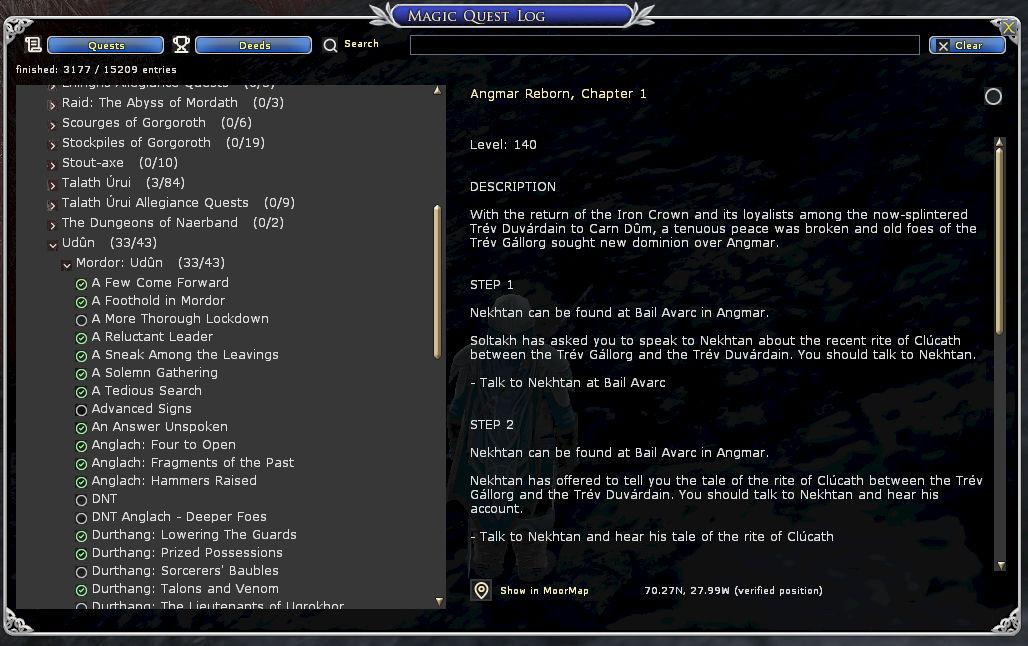
Magic Quest Log is an in-game quest and deed atlas for The Lord of the Rings Online (LOTRO) that tracks your progress directly inside a single game window. It features an expansive database of over 15,000 quests and 5,500 deeds localized in English, German, and French.
Key Features
• All-in-One Tree Structure: Organizes quests by region landscapes (e.g., Eriador, Mordor), the Epic story, festivals, crafting, and instances.
• Smart Filtering & Progress Tracking: Filter views by All, Open, Done, or Available quests, with automated "done/total" trackers and green checkmarks.
• Spoiler Protection: Hides specific steps and objectives until you actively click to reveal them.
• Map Integration: Links with the MoorMap plugin to pinpoint exact quest givers or known objective locations with a single click.
• Multi-Character Support: Dynamically adds a character switch menu if you log into multiple characters.
Importing Past Character Progress
By default, the plugin only counts achievements completed after it was installed. To sync your past character quest/deed history, follow these steps using LOTRO Companion:
1. Open your LOTRO Companion desktop app, log in your character, and navigate to Misc → Import from LOTRO... → click Refresh → click Start.
2. Open the companion tool site: llb.sirhexalot.de/spielstand.html.
3. Point the web page to your local LOTRO Companion characters folder. (Note: Processing happens locally inside your browser; no personal data or files are uploaded to an external server).
4. If you are on Chrome or Edge, click Write into the LOTRO folder. Otherwise, select Download as zip and extract the contents directly into your game's PluginData folder → Documents\The Lord of the Rings Online\PluginData.
5. Pull up the in-game window; your history will match instantly without needing to restart the game client.
Troubleshooting Tip
• If the interface does not appear in your plugin list after standard installation, type /plugins refresh (German client: /zusatzmodule aktualisieren) to force the game to scan your directory folders again.
• Because the quest and deed databases span roughly 100 MB of multi-language data, expect a brief loading stall the very first time you activate the interface session.