¶ My Quick Bar Setup
Here’s a quick walk-through of my current skill bars setup in LOTRO. I’ve custom-mapped my quickslots specifically for hotkey-driven play, instead of clicking for a much smoother combat flow
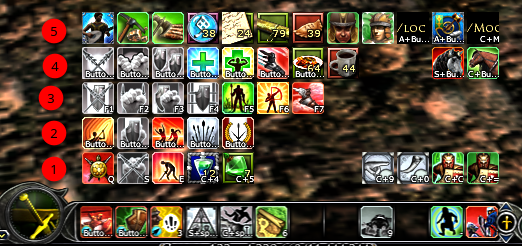
Here’s my basic philosophy 🙂
- my left hand can reach at most up to keys ‘~’ to ‘5’ so I set them up around that
- numbers on the left are the quick slot (QS) numbers
- QS1 mapped to Q, S, E (first 3) which are around ‘WASD’ keys so i can reach them easily. The rest mapped to Ctrl + number (actually i only use QSE on this bar)
- QS2 mapped to ‘mouse right-click’ + number. So I can easily fire those skills with right click+1-5
- QS3 standard F1-F7 (F1-F5 are combat skills, F6-F7 are long cooldown or toggle skills that I don’t need to use often) (keys 6 & 7 are a bit far for me to reach withouth lifting my left hand off of the keyboard)
- QS4 mapped to ‘mouse right-click’ + F1-F5
- QS5 no keys mapped to them - these are ‘clicker’ skills. Rarely used/toggle ones
Note:
- if you have more buttons on your mouse, you can assign QS5 (i used to do that, then I got a new mouse and the button mapping doesn’t work in Linux, so i just click them)
- to build muscle memory, I try to use the same key for similar functions:
e.g. - F4 is always heals
- F7 is always speed boost toggle
- Right click + F4 is always cleanse
- Right click + F5 is always anti-root/stun
- F1 or right click F1 is always opener
- F3 or right click F3 is always AOE
- Chain skills, DMG boost skills are always on QS2 and so on
- I use addons for pets, and travel skills so they don’t eat up my precious skill slots
Oh for mount, warsteeds, subscriber buttons all are in the same place + same hotkeys for all chars.
Additionally when you use warsteed or change your quickslots sets, or change your class traits, only quick slots 1-3 change, 4&5 remains stationary. So it’ll be good to place those ‘utility’ skills there. Some people make them vertical and place them on the side. I just like everything in one place.
in this game you can hotkey pretty much anything, so for example you can hotkey your outfit sets 🙂