¶ LOTRO on Linux
If you wanted to play LOTRO on Linux, for whatever reason and wondering where to start, what works (with minimal amount of tinkering) and what it feels like, read on…
Disclaimer: I’d assume you know your way around Linux and comfortable installing Linux OS, and drive partitioning, dual-boot and all the jazz. Also you are familiar with CLI and some level of troubleshooting (which is rarely required but you might face some issues sometimes and might need to roll up your sleeve to troubleshoot stuff…)]
¶ TLDR version
- Install Bazzite
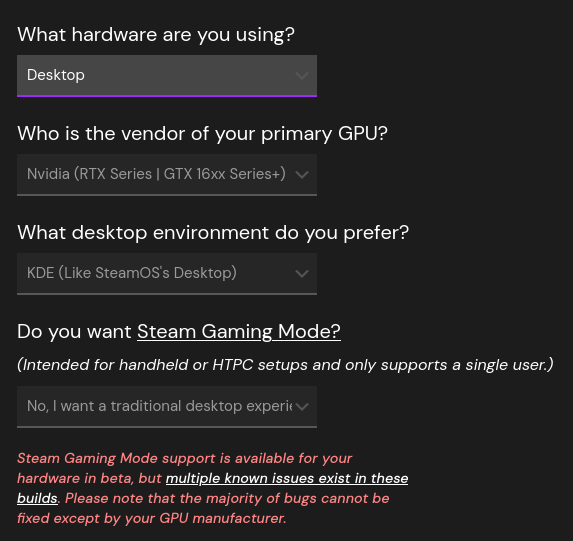
- Select Download and choose these options (you can adjust based on your hardware)
-
I do not choose to load into Steam when the machine starts, as we’re not playing LOTRO on Steam’s Big Picture mode.
-
Bazzite comes with Steam and other gaming related software, nvidia drivers and other utilities preinstalled, solving a lot of headaches for you to search and find those apps.
-
Bazzite is ‘immutable linux’ meaning most of the apps you install will be ‘flatpack’ (i.e. appimage extension) and if you want to install command line tools, you can use ‘brew’ (similar to Macos)
-
Once Bazzite boots up, launch Steam, log in and install Steam version of LOTRO
-
the reason for using Steam to run LOTRO is Steam hides the ‘translation layer aka proton/wine’ stuff from you and it’ll transparently launch LOTRO
-
once installed, LOTRO (in Steam) will launch the usual LOTRO launcher and you can log into the game as you always do in Windows.
-
When you launch LOTRO for the first time, you will notice a popup that says “Processing Vulkan Shaders” and it seems to take forever to finish. Let it finish! This is a one-time process and the reason it (Steam) needs to do is to make sure that the game’s graphical instructions can be understood by your graphic card. (before you ask, on Windows shaders are pre-compiled and already installed with the game and this step is not necessary. Shaders are small programs that tell the GPU how to render light, shadows, and textures etc, basically the game world and characters you see on your screen.
-
That should just about do it. On my system, I do not notice any performance difference between LOTRO running on Windows vs Linux (Bazzite). In fact this is not just for LOTRO, other games I played on Linux are on par or even better performance-wise, compared to Windows.
¶ Useful Links
Additional info from Emberwen:
In Steam go in your settings and under downloads check the Allow background processing of Vulkan shaders as well. This helps with loading of shaders in all games when playing on linux.